
Claude Desktop
Claude Desktop runs local (stdio) servers natively. To connect to Think4Ever's remote HTTP server, Claude Desktop utilizes the mcp-remote bridge utility via Node.js to bridge the communication transport layer.
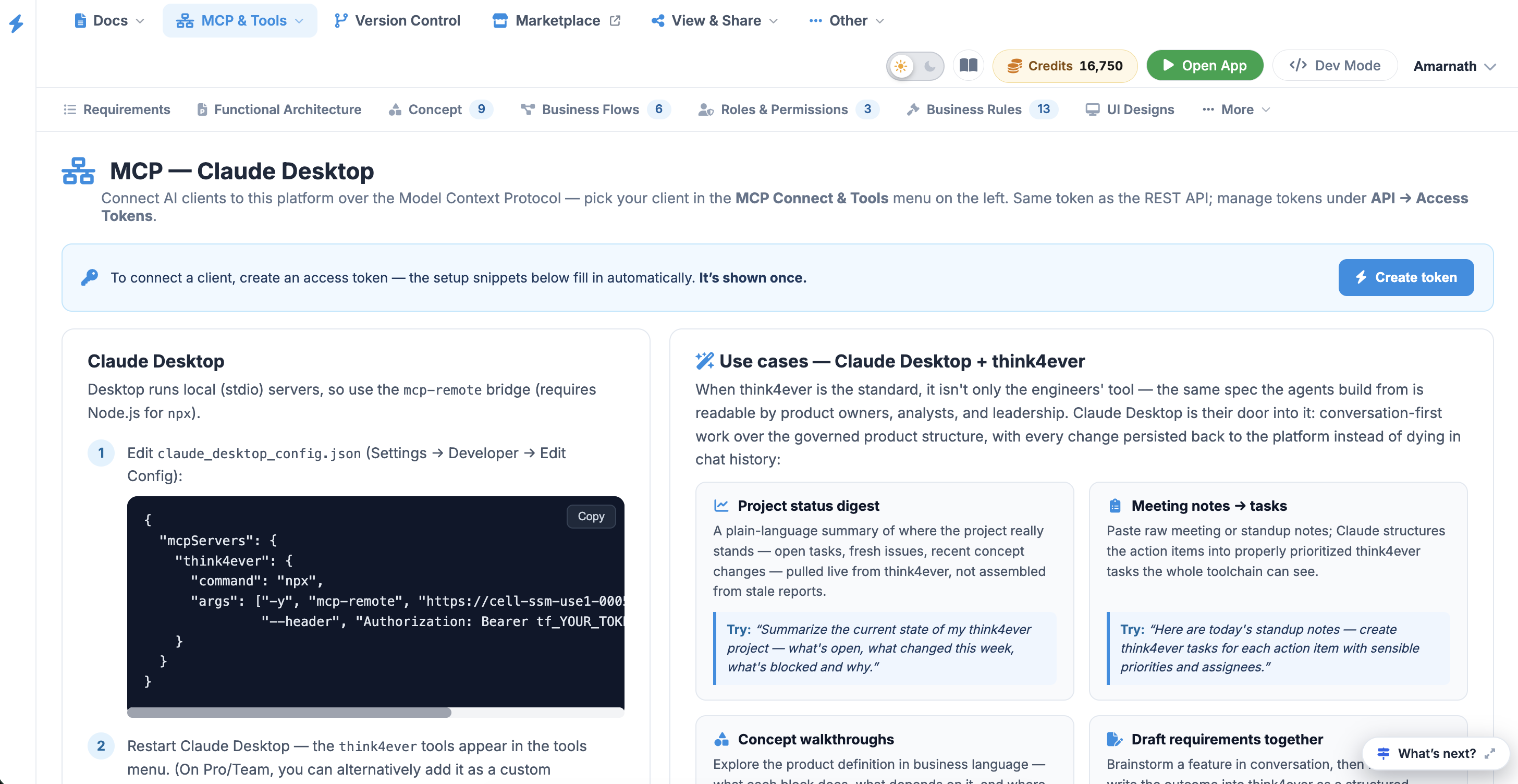 Click to enlarge
Technical Integration#
Follow these configuration steps to register the Think4Ever MCP server within your Claude Desktop application.
Desktop runs local (stdio) servers, so use
the mcp-remote bridge
(requires Node.js for npx).
Step 1#
Edit claude_desktop_config.json (Settings → Developer → Edit Config):
{
  "mcpServers": {
    "Think4Ever": {
      "command": "npx",
      "args": ["-y", "mcp-remote", "https://cell-ssm-use1-0005.us.portal.think4ever.com/mcp",
               "--header", "Authorization: Bearer tf_71b84ebb8284f86491f24b85311a55dfd2b0c9e74c678c7e"]
    }
  }
}
Step 2#
Restart Claude Desktop — the Think4Ever tools appear in the tools menu.
(On Pro/Team, you can alternatively add it as a custom Connector in settings.)
Step 3#
Start a chat and mention your project — Claude will ask permission the first time it uses each tool.
Claude Desktop is specifically optimized for the non-coding side of a project workspace. It provides product owners, business analysts, and project leads a straightforward way to interact with the project structure, review concepts, plan work sprint schedules, and triage issues without launching a code editor.
Claude Desktop Use Cases & Sample Prompts#
By connecting Claude Desktop to Think4Ever, the platform spec becomes an interactive asset for stakeholders, analysts, and leadership to keep design, business logic, and project management tasks in total sync.
| Objective | Sample Prompt to Try |
|---|---|
| Project Status Digest | "Summarize the current state of my Think4Ever project — what's open, what changed this week, what's blocked and why." |
| Meeting Notes → Tasks | "Here are today's standup notes — create Think4Ever tasks for each action item with sensible priorities and assignees." |
| Concept Walkthroughs | "Walk me through the Think4Ever concept layer by layer and point out anything underspecified or contradictory." |
| Draft Requirements Together | "We discussed a referral program — draft it as a Think4Ever technical requirement with acceptance criteria, linked to the loyalty concept block." |
| Issue Triage Sessions | "Go through the open Think4Ever issues, group duplicates, set priorities, add triage comments explaining the call, and propose a priority for each." |
| Flows in Plain Language | "Explain the onboarding flow from Think4Ever in plain words I can show to the client, and flag any step that overlaps with the signup flow." |
| Weekly Change Review | "List this week's Think4Ever concept changes and summarize for the steering meeting what was added, what changed, and why it matters." |
| Sprint Planning from Board | "Plan next sprint from the open Think4Ever tasks: propose scope and priorities, flag overload, then update the task priorities we agree on." |
| Executive Narratives | "Using the Think4Ever concept, write a one-page brief for the board describing the product's current scope, recent progress, and open risks." |
| Client Sign-Off Prep | "Prepare a sign-off summary of the Think4Ever concept for the client: flows, screens, and business rules in non-technical language." |