
Windsurf
Windsurf is an AI-powered Integrated Development Environment (IDE) created by Codeium. It is designed to act as an "AI-native" alternative to traditional editors like VS Code, built from the ground up to deeply integrate AI coding assistants into the development workflow.
Its standout feature is its AI agent, named Cascade , which can operate across two primary modes:
- Copilot Mode (Human-in-the-loop): Acts as an advanced autocomplete and inline coding assistant, completing lines or blocks of code as you type.
- Agent Mode (Autonomous): Can independently handle complex, multi-step, multi-file tasks. It can read across your codebase, plan architectural changes, execute edits across several files at once, handle terminal commands, and run tests to verify its own work.
- Agent Mode (Autonomous): Can independently handle complex, multi-step, multi-file tasks. It can read across your codebase, plan architectural changes, execute edits across several files at once, handle terminal commands, and run tests to verify its own work.
In the context of the user manual documentation we've been building, Windsurf natively supports the Model Context Protocol (MCP) via its configuration files, allowing its autonomous Cascade agent to directly read your product specifications, business rules, and API contracts straight from a centralized server (like Think4Ever) while it writes your code.
 Click to enlarge
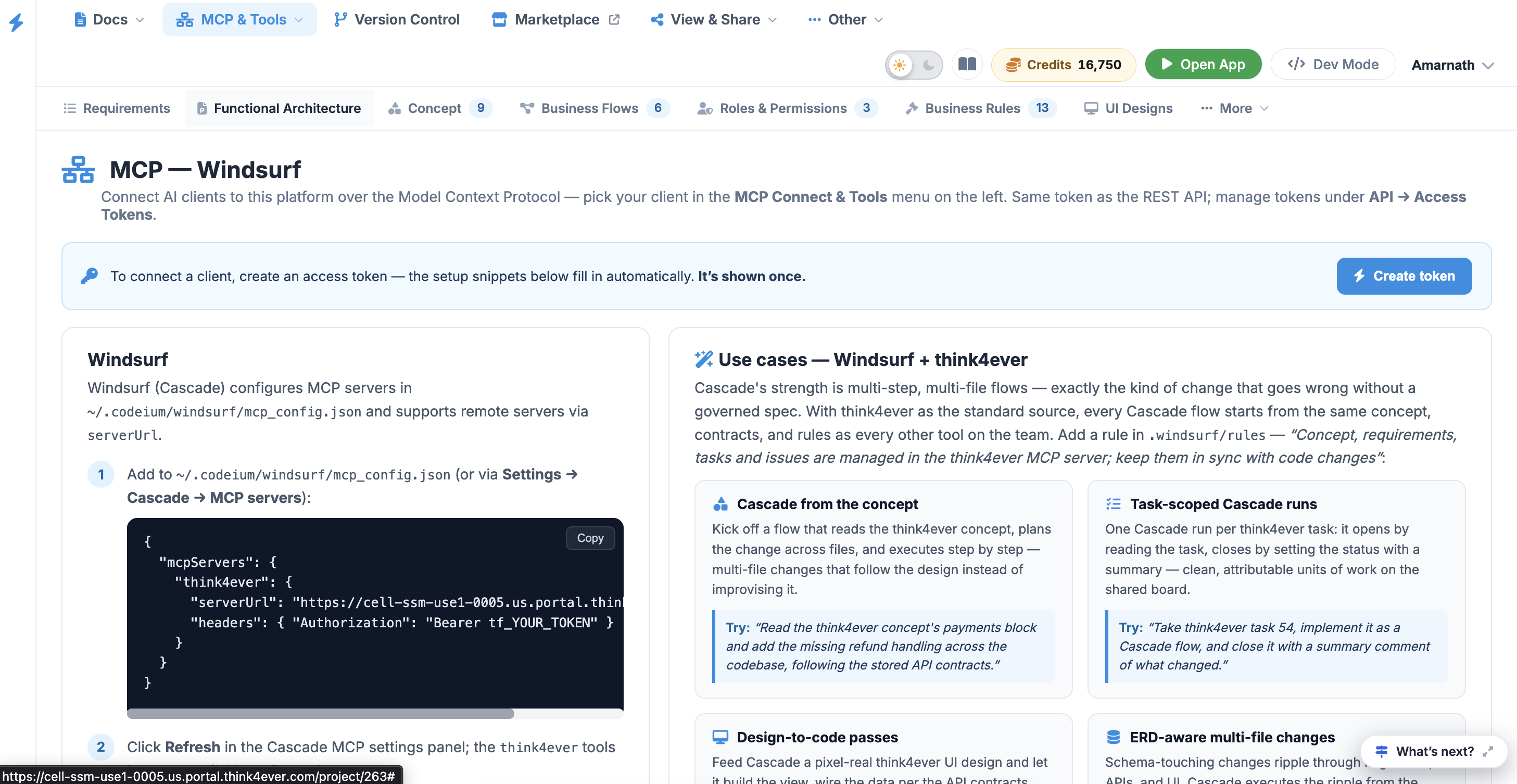
Windsurf (Cascade) configures MCP servers using an mcp_config.json configuration file and natively supports remote servers via the serverUrl field. This enables deep, multi-file agent workflows fully anchored to your central product specifications.
Technical Integration#
Follow these configuration steps to register the Think4Ever MCP server within your Windsurf IDE environment.
Step 1#
Add to ~/.codeium/windsurf/mcp_config.json (or via Settings →
Cascade → MCP servers ):
Step 2#
Click Refresh in the Cascade MCP settings panel; the Think4Ever
tools become available to Cascade.
Step 3#
In a Cascade conversation, reference Think4Ever explicitly the first time so it
discovers the tools, then it will use them on its own.
Add a Windsurf rule in .windsurf/rules to keep your
Cascade agent grounded during multi-file flows: “Concept, requirements, tasks and
issues are managed in the Think4Ever MCP server; keep them in sync with code
changes. ”
Field names differ slightly between clients (e.g., Windsurf uses
serverUrl instead of url and does not require a type
declaration). However, the underlying core constants—the endpoint and the Bearer
token—remain identical.
Windsurf Cascade Use Cases & Sample Prompts#
Cascade’s strength lies in its multi-step, multi-file autonomous flows. Connecting it to Think4Ever allows it to execute complex architectural changes while adhering strictly to your governed specs.
| Objective | Sample Prompt to Try |
|---|---|
| Cascade from the Concept | "Read the Think4Ever concept's payments block and add the missing refund handling across the codebase, following the stored API contracts." |
| Task-Scoped Cascade Runs | "Take Think4Ever task 54, implement it as a Cascade flow, and close it with a summary comment of what changed." |
| Design-to-Code Passes | "Implement the 'Reports' UI design from Think4Ever end to end — the view, the route, and the API call from the stored contract." |
| ERD-Aware Multi-File Changes | "Add the 'loyalty points' attribute the Think4Ever data model defines — migrate the schema, update the APIs per the stored contracts, and adjust the UI." |
| Compliance Sweeps | "Check this module against the Think4Ever business rules and report each violation as a tracked issue — coverage tied to the spec, not to memory." |
| Fix-and-File Loops | "Fix this bug; if you spot unrelated problems along the way, file Think4Ever issues for them instead of changing them." |
| Role-Access Pass | "Walk every route in this app against the Think4Ever roleAccess definitions and add the missing permission checks." |
| Drift Report | "Compare this repo to the Think4Ever concept and list undesigned code and unbuilt design, ranked by risk." |
| Flow Coverage Before Release | "Verify this codebase covers every step of the Think4Ever checkout flow; file a Think4Ever issue for each missing branch." |
| Spec Updates as You Ship | "Now that this feature is merged, update the Think4Ever concept block and requirement to describe the implemented behavior." |